
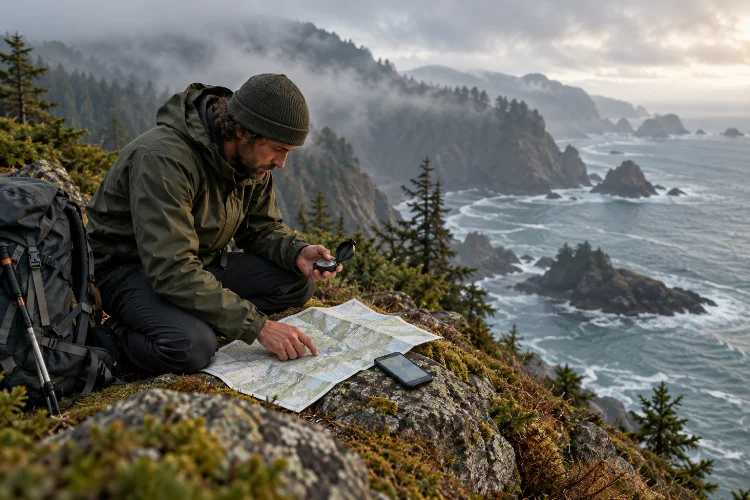
Mobile maps make navigation feel almost effortless until you enter a remote valley, dense forest, mountain basin, or isolated coastline and suddenly discover that your usual connectivity is gone.
Without reliable cellular service, simple actions such as loading a new map, checking a route online, or sharing your position may no longer work as expected.
That is why learning advanced navigation methods for low-signal wilderness destinations matters for anyone travelling beyond developed areas. Effective wilderness navigation is not based on one perfect gadget.
It combines offline mapping, topographic interpretation, compass skills, terrain awareness, GPS technology, route checkpoints, and backup procedures.
The National Park Service recommends carrying detailed topographic maps and a compass in wilderness areas and warns that GPS reception may sometimes be limited in deep valleys or heavily vegetated terrain.
The objective is simple: you should still understand where you are and where you are going even when connectivity disappears or one navigation tool stops working.
1. Separate Cellular Coverage From Your Navigation System
The first step is changing the way you think about a smartphone in the wilderness.
A phone may contain an excellent navigation app, but the app becomes far less useful if the map itself has not been downloaded beforehand.
Remote areas may have weak, intermittent, or nonexistent cellular connectivity, so anything that depends on continuously loading online data creates an unnecessary vulnerability.
Before departure, download maps covering not only the planned route but also the surrounding area. Your offline coverage should include possible bailout trails, nearby roads, valleys, alternate campsites, and emergency exit points.
Some National Park Service maps, for example, can be downloaded for offline use so visitors can continue accessing park information away from reliable coverage.
Do this during preperation rather than discovering at the trailhead that only part of your route has been saved.
2. Make Topographic Maps Your Navigation Foundation
A navigation app tells you where you are. A good topographic map helps explain what the landscape around you actually means.
Contour lines represent elevation and the shape of the terrain. Closely spaced contours generally indicate steep slopes, while widely spaced lines represent gentler terrain. Maps can also reveal rivers, ridges, valleys, lakes, roads, and other features useful for keeping yourself oriented.
The U.S. Geological Survey explains that topographic maps use contour lines to represent the three-dimensional shape of the landscape on a two-dimensional surface.
That becomes extremely useful in low-signal areas.
Suppose your digital track disappears or your device fails. If you know that your route follows a valley northward until reaching a saddle between two peaks, you already have a mental picture of where you should be.
Instead of following a screen blindly, learn to match what you see on the map with what you see around you.
3. Combine Map and Compass Navigation
A compass looks almost primitive next to a modern GPS device, but that simplicity is exactly why it remains useful.
It does not require cellular service or battery power. When combined with a topographic map, it allows you to establish direction, follow bearings, orient the map, and confirm whether your movement matches the planned route.
USGS navigation guidance explains how map scale, bearings, cardinal directions, and a compass can be combined to determine distance and direction between locations.
The important word here is practice.
Carrying a compass without knowing how to use it offers very little protection. Practice orienting maps, taking bearings, identifying landmarks, and following simple courses somewhere familiar before depending on those techniques deep in the wilderness.
The U.S. Forest Service similarly recommends bringing a map and compass as a backup even when GPS is being used for primary navigation.
Redundancy works only when you can actually use the backup.
4. Correct for Magnetic Declination
One detail that separates casual compass use from accurate navigation is magnetic declination.
A map usually references true north, while a magnetic compass responds to Earth’s magnetic field. The angle between those directions varies depending on your location and also changes gradually over time.
NOAA’s National Centers for Environmental Information explains that magnetic declination is the difference between magnetic north and true north and that the correct value is necessary when converting between magnetic and true bearings.
On short, obvious trails, a small mistake may barely matter.
Over several kilometers of off-trail travel, however, repeatedly following an incorrect bearing can gradually move you far away from the intended route.
Check the current declination for your destination before the expedition. Do not automatically trust an old number printed on a decades-old map, because declination changes with both location and time.
It is a small adjustment that can make a surprisingly large difference.
5. Navigate With Terrain Association
Advanced wilderness navigation is not about staring constantly at a compass or GPS.
One of the most useful skills is terrain association – matching physical features around you with features shown on the map.
Ridges, streams, lakes, valleys, saddles, cliffs, and peaks can all function as navigational references. Instead of waiting until you become uncertain, continuously compare your surroundings with the map as you move.
For example, imagine travelling east along the northern side of a river. Your map shows a tributary joining from the north approximately three kilometers ahead, followed by a steep ridge.
When you reach the tributary, you have a natural checkpoint. When the ridge becomes visible, you gain another confirmation.
This method means your navigation is being checked occassionally throughout the day rather than only when something feels wrong.
Olympic National Park advises off-trail travelers to plan routes according to terrain features rather than trusting informal cairns, flagging, game trails, or social trails that may lead somewhere completely different.
6. Create Checkpoints and Catching Features
Long navigation legs increase the chance that a small error becomes a big one.
Break the route into shorter sections marked by obvious checkpoints. These might include a creek crossing, trail junction, saddle, lake, ridgeline, road, campsite, or distinctive change in elevation.
A catching feature is something difficult to miss that tells you when you have travelled too far.
Imagine you are searching for a small side trail before reaching a major river. The river becomes your catching feature. If you arrive at it without finding the junction, you immediately know that you have overshot the turn.
This is much safer than walking for another two hours while hoping the trail eventually appears.
Advanced navigation often feels slower because you verify your position frequently, but early corrections usually save much more time than recovering from a major route error.
7. Use GPS as One Layer, Not the Entire System
GPS technology is extremely valuable in remote areas.
It can provide coordinates, record tracks, measure distance, mark campsites, store waypoints, and help confirm your location when visibility becomes poor.
But electronic navigation still has weaknesses.
Olympic National Park notes that GPS units may struggle to receive signals in some deep valleys and heavily vegetated wilderness areas. Batteries can also drain, screens can break, devices can become wet, and extreme temperatures can reduce performance.
A stronger system uses electronics and traditional navigation together.
Use GPS to confirm your reasoning rather than replacing it. If the device says you are on a particular ridge, look at the terrain and map and verify that the position actually makes sense.
Also protect battery reserves. Reduce unnecessary screen use, carry an appropriate backup power source, and avoid running multiple energy-hungry navigation applications continuously when they are not needed.
8. Learn How to Recover When Your Position Is Uncertain
Getting temporarily unsure of your position is not automatically an emergency. Continuing to walk randomly can turn it into one.
When the landscape stops matching your expectations, stop moving and review the last location you knew with confidence.
Ask what changed after that point. Did you cross a stream? Climb farther than expected? Miss a junction? Follow another trail? Does your elevation make sense compared with the contour lines?
Then use multiple clues instead of relying on one assumption.
Check your compass, terrain features, map, elevation information, GPS position if available, and the direction you have been travelling.
If the evidence still does not make sense, returning carefully to the last confirmed point may be smarter than pushing forward.
The Forest Service specifically advises lost travelers not to panic but to stop, relax, think, and reassess their location.
That sounds simple, but calm decision-making is one of the most important navigation tools you carry.
9. Prepare for Whiteouts, Darkness, and Low Visibility
Navigation becomes much harder when landmarks disappear.
Fog can hide mountains. Snow can bury trails. Darkness eliminates distant reference points, while heavy rain can make both visibility and map handling difficult.
This is where bearings, checkpoints, elevation information, and terrain knowledge become much more valuable.
The National Park Service emphasizes that travelers entering areas where snow can obscure trails should have map-and-compass navigation and route-finding skills.
Plan difficult sections with visibility in mind.
Crossing an open plateau during clear daylight may be straightforward. Attempting the same route after sunset or during thick fog could require substantially more precise navigation.
Whenever possible, schedule complicated terrain earlier in the day and leave yourself enough time to stop if conditions become realy difficult.
10. Build Navigation Redundancy Before Departure
Advanced wilderness navigation works best as a system with several independent layers.
Your primary system might be an offline map on a phone. The second could be a dedicated GPS unit. The third could be a paper topographic map and compass backed by actual terrain-reading skills.
These systems should not all share the same weakness.
Two mapping apps on one phone are not true redundancy if the phone itself fails.
Leave No Trace also recommends using maps and compasses as part of careful wilderness planning, both for safety and to avoid creating unnecessary cairns, markings, or other navigation impacts on the landscape.
Before entering a low-signal region, practise switching between your navigation methods. Mark critical coordinates, know where emergency exit routes lead, and understand the major terrain surrounding your planned corridor.
The time to learn your backup system is before the primary one disappears.
Reliable wilderness navigation is not about finding a single technology that never fails. It is about building several navigation methods that support each other when connectivity, visibility, batteries, or satellite reception become unreliable.
Using advanced navigation methods for low-signal wilderness destinations means combining offline maps, topographic interpretation, compass bearings, correct magnetic declination, terrain association, checkpoints, GPS confirmation, and sensible recovery techniques.
Before your next remote journey, download more map coverage than you expect to need, study major terrain features, practise with a compass, and create navigation checkpoints along the route.
Technology can make wilderness travel easier, but the strongest navigation system is still the one you understand well enough to use when conditions stop being convenient.